A subdomain is an additional part of your primary domain. For example, blog.example.com is a subdomain. Please, follow this tutorial to create a subdomain in cPanel.
1. Log in to your cPanel account.
2. In the Domains section, click on Domains.
3. Click on Create A New Domain.
4. Under the Create a New Domain, enter the following details:
- Domain: Enter your main domain name. This is the base for your subdomain.
- Share document root: Must uncheck it to create your subdomain.
- Subdomain: It fills up automatically. Remove the domain extension (like .com or .net).
- Leave all other options as it is.
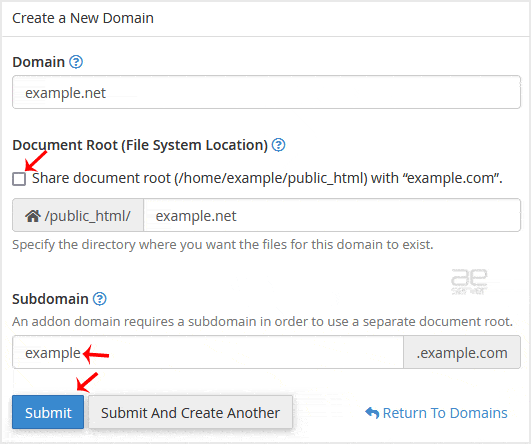
5. Click on Submit.
You should see a success message that the subdomain has been created.




