You can use CloudLinux Selector to enable ionCube Loader in Plesk.
1. Log in to your Plesk account.
2. Click on the Pull icon in the right sidebar and choose PHP Selector.
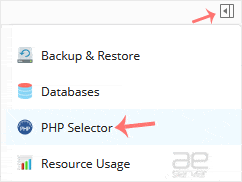
3. Click on the Extensions menu.

Note: If the Extensions page shows an error related to the native PHP version, change it to a non-native version first.
4. Checkmark the ioncube_loader. Once enabled, it will display a success message.

The message will read that the module ionCube Loader is saved.




