Titan Business Email
Plans & Pricing
| Pro | Premium | Ultra | |
|---|---|---|---|
| Platform Features | |||
| Email storage | 10 GB | 30 GB | 100 GB |
| Mail Hosted by | Titan | Titan | Titan |
| Rich webmail | ✓ | ✓ | ✓ |
| iOS and Android apps | ✓ | ✓ | ✓ |
| Built in Calendar | ✓ | ✓ | ✓ |
| Contacts | ✓ | ✓ | ✓ |
| Advanced Features | |||
| Read Receipts | ✗ | ✓ | ✓ |
| Email Templates | ✗ | ✓ | ✓ |
| Contact Groups | ✗ | ✓ | ✓ |
| Send Later | ✗ | ✓ | ✓ |
| Follow-up Reminders | ✗ | ✓ | ✓ |
| HTML in composer | ✗ | ✓ | ✓ |
| External forwarders | 3 | 3 | 3 |
| Multi-account support | ✓ | ✓ | ✓ |
| Turbo Search | ✗ | ✓ | ✓ |
| Send as Alias | ✗ | ✓ | ✓ |
| Two-Factor Authentication | ✗ | ✓ | ✓ |
| Undo Send | ✗ | ✓ | ✓ |
| Advance Anti-virus | ✓ | ✓ | ✓ |
| Block Sender | ✓ | ✓ | ✓ |
| Allowlists | ✓ | ✓ | ✓ |
| Auto-reply | ✓ | ✓ | ✓ |
| Grammar and Spell Check | ✗ | ✓ | ✓ |
| Power Features | |||
| Email Campaigns (Email marketing) | ✗ | ✗ | ✓ |
| Titan AI | ✗ | ✗ | ✓ |
| Advanced Signature Designer | ✗ | ✗ | ✓ |
| Appointment Booking | ✗ | ✗ | ✓ |
| Priority Inbox | ✗ | ✗ | ✓ |
| Email Designer | ✗ | ✗ | ✓ |
| Interface and service | |||
| Advanced Search | ✓ | ✓ | ✓ |
| HTML signatures | ✓ | ✓ | ✓ |
| One-click import of existing emails & contacts | ✓ | ✓ | ✓ |
| Data encryption | ✓ | ✓ | ✓ |
| Advanced Anti-spam | ✓ | ✓ | ✓ |
| Custom DKIM support | ✓ | ✓ | ✓ |
| Email transfer rules | ✓ | ✓ | ✓ |
| Email alias | ✓ | ✓ | ✓ |
| IMAP/POP3 support | ✓ | ✓ | ✓ |
| Vacation responders | ✓ | ✓ | ✓ |
| Catchall account | ✓ | ✓ | ✓ |
| Email forwarding | ✓ | ✓ | ✓ |
What Do You Get with Titan?

Apple App Store
This app is exclusively for customers using an active Titan mail account for IOS devices.

Google Playstore
This app is exclusively for customers using an active Titan mail account for Android devices.
Don’t lose sleep, wondering if your prospect read that crucial quote. Get notified the moment your email gets opened with Read Receipts.

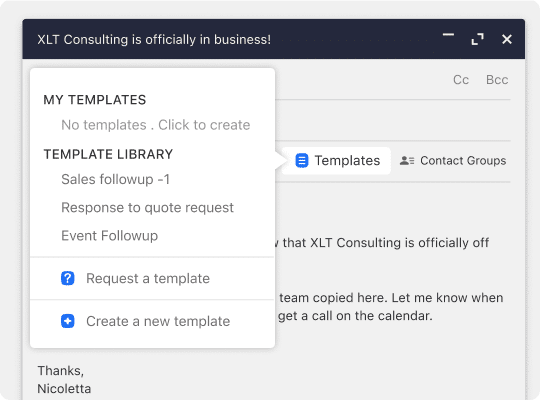
Save time by saving your frequently sent responses as email templates for easy access.
Make your emails more visually engaging. Use HTML codes to include forms, CTA buttons, and other interactive elements.

Give your messages the attention they deserve by making sure they’re sent at the optimal time for your recipient.

Never drop the ball midway through a conversation with Follow-up Reminders that let you circle back on important emails at the right time, every time.

With Priority Inbox, automatically prioritize your important emails based on mailbox behavior to view them in a separate tab.

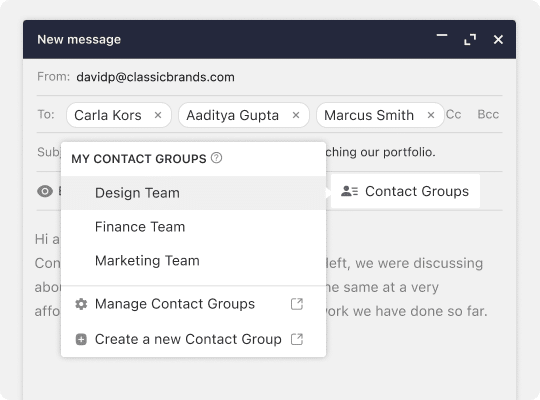
Group frequently emailed recipients to reach out to them simultaneously, so you no longer have to add each email address when composing a new message.
Two-Factor Authentication ensures only you can access your account by entering both a dynamic secret code and your account password.

Free Trail – Try Titan Mail for 30 Days
Powerful Tools for Your Inbox
Email Platform
Advanced Features
Interface and Service

Read Receipts
Get notified the moment your recipient opens your email.

Priority Inbox
Sort your most important emails from the rest so you can focus on what matters most.

Send Later
Give your messages the attention they deserve by sending them at the optimal time for your recipient.

Undo Send
Mistakes happen…and you can fix them. Take back your sent email to revise your error.

Follow-up Reminders
Get notified the moment your recipient opens your email.

Email Templates
Save time by saving your frequently sent responses for easy access.

Turbo Search
Add an additional layer of security to your email account to ensure your emails are accessible to only you.

Contact Groups
Email your most frequently grouped contacts simultaneously.
Frequently Asked Questions – Titan Mail
-
What is a business email?
What is a business email?
A business email is a professional, domain-based email address that helps boost your brand identity and credibility. Instead of relying on a generic Gmail, Hotmail or other free service, your email ends in @yourbusiness.ae (or @yourdomain.ae), demonstrating trustworthiness and professionalism to clients and partners.
With Titan Mail from AEserver, you can create as many inboxes and email addresses as your organization needs. Every employee, department, or service can have a unique, personalized business email, ensuring consistent and professional communication across your entire company.
-
Why do I need a custom email on my domain?
In today’s digital age, trust and credibility are everything. Anyone can create a free email account and pretend to represent a business, but a custom domain-based address instantly signals professionalism and authenticity. By using an email address that ends in @yourbusiness.ae, your communications stand out from spammers and scammers, reassuring clients that you’re a legitimate and reputable company. Plus, a branded email helps build consistent brand recognition with every message you send.
-
Can I create a business email without a website?
You can create a custom email without a website or a web hosting account – this ideal if you are just starting up, but in order to use Titan you will need to own the domain (example: mohammadali.ae) If you don’t have a domain yet, you can get one from AEserver while signing up for a business email.
-
Can I migrate my existing emails and contacts from other platforms?
Yes. Titan comes with built-in migration tools to help you easily move existing email data to your Titan account. If you run into trouble with the migration at any point, AEserver’s dedicated support staff is available 24/7 to help you out and guide you in the right direction to ensure a smooth migration.
-
Can I access my email account on a mobile device?
Absolutely. Titan can be accessed right from your web browser, or through dedicated mobile apps for Android and iOS. If you prefer using third-party email clients, Titan also integrates seamlessly with popular options like Apple Mail and the iOS Mail app, giving you the freedom to stay connected wherever you are.
-
What type of support will I get with Titan?
AEserver’s support team is available 24/7 via email or live chat to answer your questions and provide any help needed.
-
Does Titan include a spam filter?
Yes. Titan comes with advanced anti-spam, where all inbound email messages pass through a spam filter before reaching your inbox. Using Titan will dramatically reduce junk mail and vulnerability to viruses.
-
How do I use Titan Business Premium features?
Titan Business Premium offers a suite of powerful features—such as Read Receipts, Send Later, Follow-Up Reminders, and Email Templates—that help you stay on top of your communications. These features are available for you to test and use during your complimentary Titan Business Premium trial. Once your trial ends, you can easily purchase the Titan Business Premium plan for as many mailboxes as you need right from your Titan control panel, ensuring you never miss out on these enhanced capabilities.




