Before adding the addon domain, point your addon domain nameservers to your primary domain nameservers and wait for domain propagation. It usually takes between 12 and 24 hours for the changes to take effect.
1. Log in to your cPanel account.
2. In the Domains section, click on Domains.
3. Click on Create A New Domain.
4. Under the Create a New Domain, enter the following details:
- Domain: Your Addon domain name, such as example.net.
- Share document root: Must uncheck it to create your addon domain.
- Subdomain: It fills up automatically. Remove the domain extension (like .com or .net).
- Leave all other options as it is.
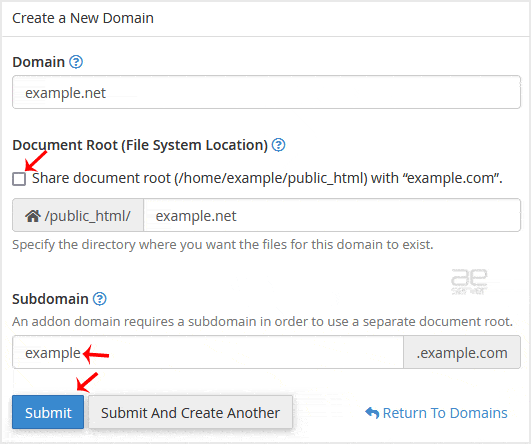
5. Click on Submit.
You should see a message that the domain has been created.




